Catchy for Wear OS, bridging TWAs and the Wearable Data Layer
May 24, 2026 | 1985 words | 9 min
Building a Wear OS companion app for Catchy, a public transport app for Wellington, Otago, and Christchurch, using the Wearable Data Layer to sync user state to the watch and bridge a Trusted Web Activity to native Android code.
Catchy for Wear OS is out!
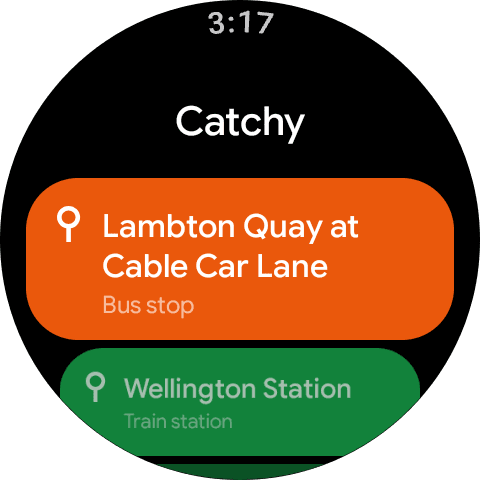
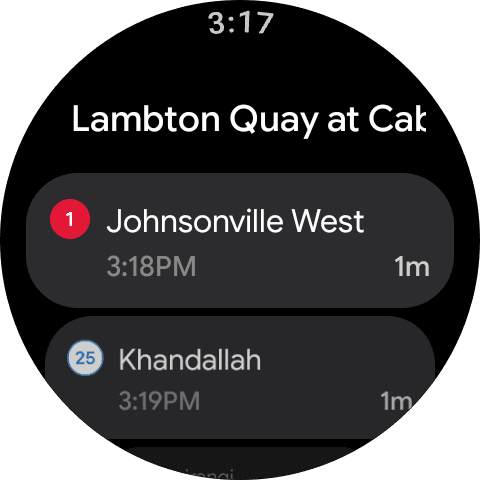
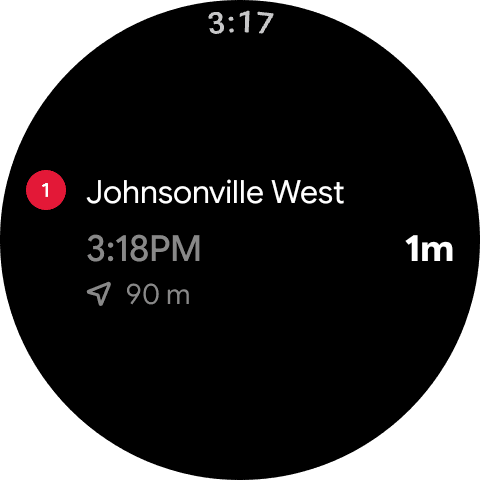
Over the past few months I've been working on a Wear OS companion app for Catchy, a public transport app for Wellington, Otago, and Christchurch. A huge thanks to David Buck for letting me contribute and for the product feedback throughout. The watch app supports those regions too, so your saved stops and live departures can come with you whether you're using Catchy in Wellington, Otago, or Christchurch.
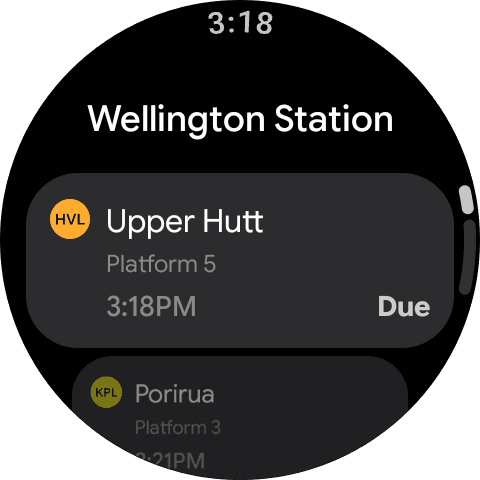
The watch app gives you Catchy at a glance, your saved stops right on your wrist, with your closest stops right at the top of the list. Tap into any stop and your filters are already there, the services, directions, and destinations you've set in the Android app carry straight over with the same Catchy feel. Cancelled services, bus replacements, and live timing are all there too. Everything syncs over from the Android app, so there's no configuration required.
To get started, grab Catchy from the Play Store and your favourites will sync over from the Android app automatically.
Wearable Data Layer
The key piece to get right in the watch app is ensuring that the watch always reflects what you've set up in the Android app: your stops, filters, and preferences. By design the watch has no way to set any of this itself, so the question becomes: how do you guarantee that state makes it to the watch, and what happens when it doesn't?
Initial exploration with MessageClient
MessageClient was the first thing I reached for. Early on I had the idea that there might be some bidirectional communication between the phone and watch, with the watch asking for state and then the phone responding. MessageClient seemed like a natural fit for that model.
It works by fetching the connected nodes in the Wear network and broadcasting a message to each one:
val payload = stateJson.toByteArray(Charsets.UTF_8)

val nodes = Wearable.getNodeClient(context).connectedNodes.await()

nodes.forEach { node ->
    Wearable.getMessageClient(context).sendMessage(
        node.id,
        STATE_PATH,
        payload,
    ).await()
}
On the watch side, you register an OnMessageReceivedListener to handle incoming messages:
class CatchyStateMessageListener : MessageClient.OnMessageReceivedListener {
    override fun onMessageReceived(event: MessageEvent) {
        if (event.path != "/catchy/state") return

        val stateJson = String(event.data, Charsets.UTF_8)

        // Parse and persist the received Catchy state.
    }
}
The problem is that MessageClient is fire-and-forget. If the watch is off, out of range, or the app is asleep when the message is sent, you miss it. Coming back to my requirements, MessageClient wasn't quite what I needed. I could have modified it to fit, but there was a better approach waiting.
Beyond Fire and Forget
The Wearable Data Layer gives you a few other clients and methods for sending data from the phone to the watch and vice versa.
Once I ran into this issue of being more resilient I went back to the drawing board and took a look at what other options there were, though I almost hand-rolled my own solution before I found what I was looking for.
Here's a table I've assembled that breaks down each client, how it works, and what it supports:
| Client | How it works | Supports > 100 KB? | Survives disconnection? |
|---|---|---|---|
DataClient | Syncs persistent DataItem objects across devices | Yes (via Asset) | Yes |
MessageClient | Sends a best-effort message to a connected node | No | No |
ChannelClient | Opens a bidirectional stream between two nodes | Yes | No |
Note: Some features like the transfer limit aren't a requirement for us, but it's still useful to be aware of the client limits.
Based on my requirements though, DataClient appeared to be the best option for me. The other clients still have their place, especially for large transfers, request/response flows, or frequent syncs while both devices are connected.
Persistent State Sync with DataClient
The DataClient implementation ended up being small because the API handles the hard parts for this use case, including persistence, delivery after reconnect, and synchronization across nodes.
On the phone, state sync starts by creating a PutDataMapRequest, writing the Catchy state into its DataMap, and sending it through DataClient.
PutDataMapRequest req = PutDataMapRequest.create("/catchy/state");
req.setUrgent();

DataMap map = req.getDataMap();
map.putString("favourites", favouritesToJson(state.favourites));
// ... other state fields
map.putLong("timestamp", System.currentTimeMillis());

Wearable.getDataClient(context)
        .putDataItem(req.asPutDataRequest())
        .addOnSuccessListener(item -> Log.d(TAG, "Synced state to watch: " + item.getUri()))
        .addOnFailureListener(e -> Log.w(TAG, "Failed to sync state to watch", e));
The timestamp is important because Data Layer events can arrive out of order. The watch only applies an update if it is newer than the state already stored locally.
The OnSuccessListener and OnFailureListener are also quite useful for debugging, though unless the Wear client is unavailable, you are unlikely to run into that case.
class WearMessageListenerService : WearableListenerService() {
    @Suppress("LoopWithTooManyJumpStatements")
    override fun onDataChanged(dataEvents: DataEventBuffer) {
        for (event in dataEvents) {
            if (event.type != DataEvent.TYPE_CHANGED) continue
            val item = event.dataItem
            if (item.uri.path != WearStateSync.STATE_PATH) continue

            val dataMap = DataMapItem.fromDataItem(item).dataMap
            WearStateSync.saveIfNewer(this, dataMap)
        }
    }
}
On the watch, the receiving side follows the same shape as the earlier MessageClient example, but with one important difference. It runs through WearableListenerService.
When an event is sent, one of our key failure cases before was when the watch was closed or idle. With the DataClient we can use that with the WearableListenerService, which binds our WearMessageListenerService so that when we receive an event that service is spun up, we persist the data, then the service gets destroyed. This makes the sync quite efficient battery-wise.
<service
    android:name=".wear.WearMessageListenerService"
    android:exported="true">
    <intent-filter>
        <action android:name="com.google.android.gms.wearable.DATA_CHANGED" />
        <data
            android:scheme="wear"
            android:host="*"
            android:path="/catchy/state" />
    </intent-filter>
</service>
A question you may be asking now is why can't we use the WearableListenerService with MessageClient? You can, and it does let the watch receive messages while the app is closed. What it does not solve is disconnected delivery. If the watch is unavailable when the message is sent, there is still no persistent state waiting for it later. That is where DataClient changes the shape of the problem.
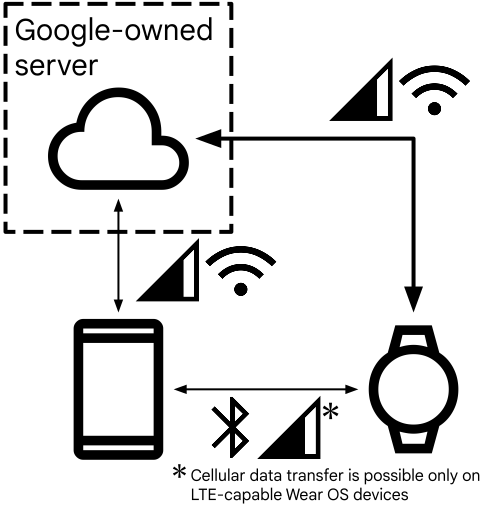
In the happy path, the watch is connected directly to the phone when a new DataMap is written to /catchy/state, so the update can be sent immediately.
If the watch is off, disconnected, or otherwise unavailable, DataClient keeps the latest update locally on the phone. Once the watch reconnects, that state is delivered and WearMessageListenerService persists it.
The Data Layer is not limited to Bluetooth either. If both devices have network access, Google Play services can route the update through Google's servers so the sync can still complete.
Source: Overview of Data Layer API
With the design I've implemented for the Catchy Wear OS app, the watch will always be in sync with the phone. No matter if it's offline and comes back online, or it's already open, the watch will immediately get updates from the phone.
At that point, the phone-to-watch sync path was reliable. The remaining problem was getting Catchy's web state out of the Android TWA in the first place.
Trusted Web Activities
Catchy's Android app is a Trusted Web Activity (TWA), a PWA packaged into an Android shell using the system browser rather than an embedded WebView.
The upside is a full browser runtime with no bundled web engine, but a limitation here is that the Android wrapper has no direct access to the browser's
internal state. Since Catchy stores your preferences in localStorage rather than any cloud backend, getting that state to the watch required a bridge between the web app and native Android.
Bridging the TWA
The solution to getting state out of the TWA is a postMessage channel between the web app and the native Android code.
However, you can't just open a channel and start sending messages, the TWA security model requires the app to prove ownership of the domain first.
This is done through Digital Asset Links, where an assetlinks.json file hosted on catchy.nz declares that the Android app and the website are owned by the same developer.
For the postMessage channel to work, two specific permissions need to be declared in that file:
"delegate_permission/common.handle_all_urls",
"delegate_permission/common.use_as_origin"
handle_all_urls establishes the app as a handler for the domain, and use_as_origin is what specifically unlocks the postMessage channel,
telling the browser that the Android app is permitted to communicate as if it were the origin.
With that verified, the channel can be opened and state can flow from localStorage to the Data Layer.
The postMessage Handshake
With a valid DAL relationship, the next step is opening the channel. To do this we need to get the CustomTabsSession and call requestPostMessageChannel().
session.validateRelationship(CustomTabsService.RELATION_USE_AS_ORIGIN, mSourceOrigin, null);Once onRelationshipValidationResult() comes back with a successful result, we can request the channel:
session.requestPostMessageChannel(mSourceOrigin, mTargetOrigin, new Bundle());When the channel is ready, onMessageChannelReady() fires and we can start communicating.
The first thing we do is announce ourselves to the web app, then immediately request the current state:
postToTwa("{ \"source\": \"catchy-android\", \"type\": \"channelReady\" }");
postToTwa("{ \"type\": \"REQUEST_STATE\" }");
On the web side, the app listens for the incoming port and captures it for sending messages back:
window.addEventListener("message", (event) => {
  if (event.ports && event.ports[0]) {
    twaPort = event.ports[0];
    twaPort.onmessage = (e) => {
      console.log("Message from Android:", e.data);
    };
  }
});
When the web app receives REQUEST_STATE it responds with a full STATE_SNAPSHOT of the current Catchy preferences.
From that point on, any changes to relevant keys in localStorage are emitted as individual key-change messages, so the Android side stays up to date without needing to request another full snapshot.
On receive of a postMessage from the web app we then handle the STATE_SNAPSHOT or individual key change, which we pass on to the watch app so it can update immediately.
Wrapping Up
This was my first Wear OS project and it was a really enjoyable one to work on.
A lot of it came down to reading the docs thoroughly and working through the communication flows until they clicked.
The Data Layer architecture in particular I'm quite proud of. The resilience you get out of the box with DataClient means that as long as there's a network connection somewhere, the watch will sync.
One thing I'd recommend to anyone starting out with Wear OS development is making use of the preview UIs in Android Studio. Being able to see your watch UI without deploying to a device every time is a huge time saver, though there's no substitute for testing on the real thing too.
I'm planning a possible follow-up post on my broader Wear OS learnings about Kotlin, Compose, and some of the other things I picked up along the way, so keep an eye out for that.
A big thanks again to David Buck for letting me contribute to Catchy and for the product feedback throughout the project. If you haven't already, go grab the app from the Play Store and give it a try. If you have any feedback, you can reach out at feedback@catchy.nz.